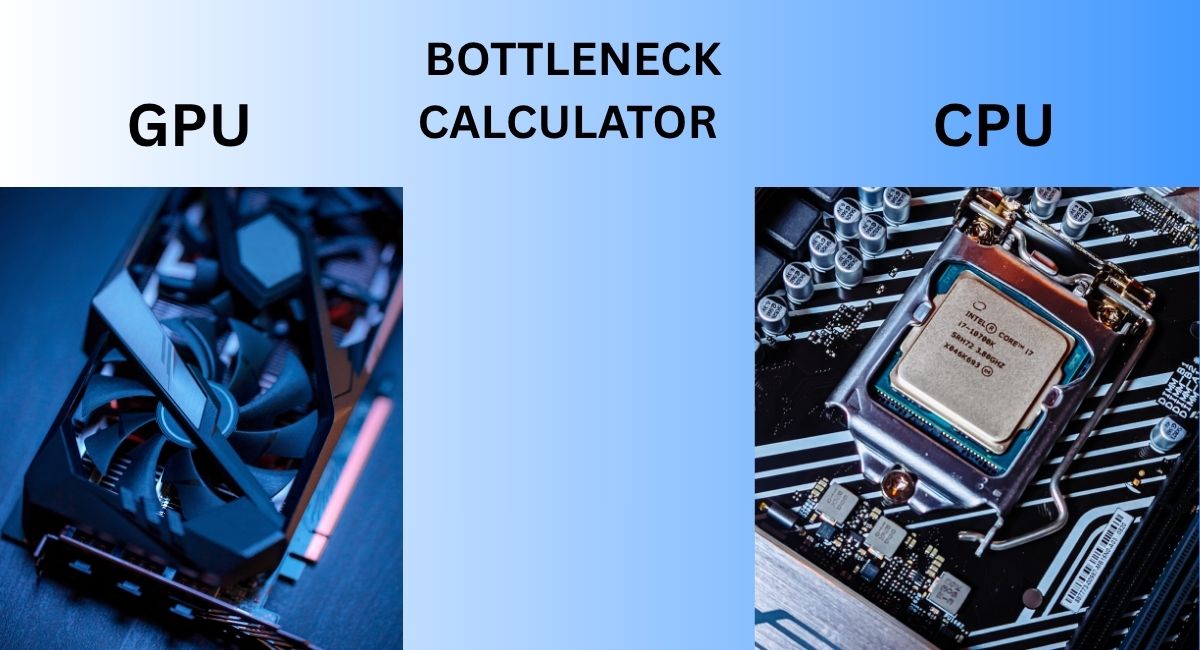
PC Bottleneck Calculator 🚀
Our easy-to-use tool compares your CPU and GPU to reveal potential bottlenecks.
Analysis Results
What Is a Bottleneck in a PC?
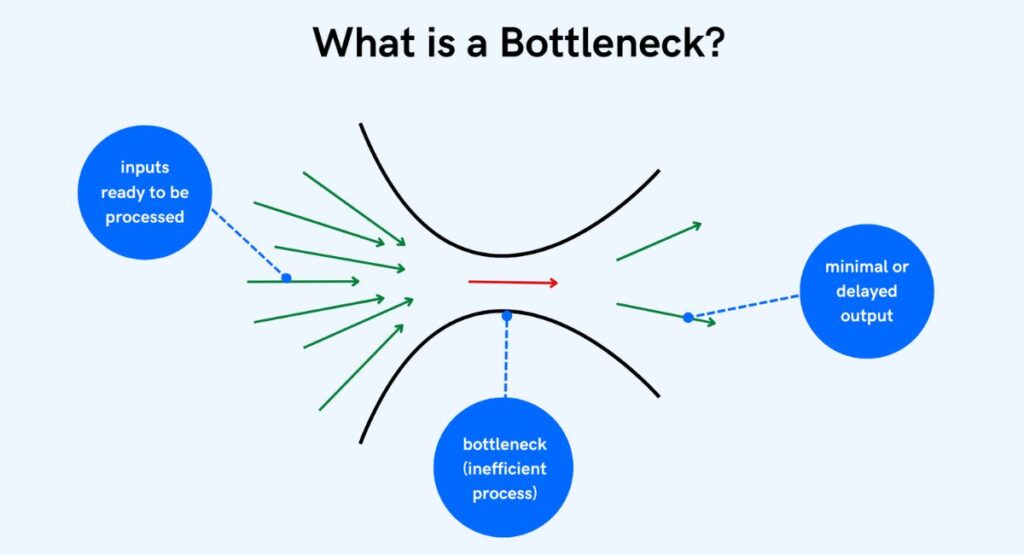
When your PC feels slow or laggy, the cause is often a bottleneck. To identify these issues, you can use a bottleneck calculator or an online PC bottleneck calculator to see which component is holding your system back. A situation where one component restricts the performance of another. It’s similar to water flowing through a narrow pipe; the entire system is affected. The most common bottlenecks involve the CPU and GPU. A weak CPU can limit a powerful GPU, or a GPU may not keep up with the processor.
These mismatches can result in low FPS, high CPU usage, stuttering, or even thermal throttling. Keeping the CPU and GPU balanced is essential for smooth performance. By understanding bottlenecks, you can make smarter upgrade decisions and save both time and money when building or improving your PC.
What Is a Bottleneck Calculator and How Does It Work?
A bottleneck calculator is a tool for your PC parts. It performs a hardware compatibility analysis to determine whether your CPU, GPU, RAM, and storage are properly balanced. Based on this, it calculates a bottleneck percentage to show which component may be limiting overall system performance.
Interpreting bottleneck results is easy based on system configuration analysis :
- Low bottleneck percentage: your PC components are working nicely, good and balanced
- High percentage bottleneck: if there is a mismatch in working, causing the PC slowdowns
Why gamers and creators use bottleneck calculators is clear. These tools help plan, build before buying parts. They save money by showing weak points before purchase. They also provide upgrade suggestions to improve your setup. A builder might discover that their GPU is too strong for their CPU. Another might learn they need faster RAM speed and capacity. With this data, you can make smarter choices and create balanced system builds for work or gaming.
Causes of CPU Bottlenecks

- A CPU bottleneck happens when the processor is slow or outdated and can’t keep up with system demands.
- Having too few cores, low clock speed, or a small cache limits the processor’s ability to handle tasks efficiently.
- Running heavy apps or performing CPU-intensive tasks can overload the CPU.
- Symptoms include high CPU usage while the GPU stays low, creating performance issues.
- In gaming, games stutter, slow down, and the CPU works at 100%, indicating a bottleneck.
🔹 How to Fix CPU Bottlenecks
- Start with proper system upgrade planning to identify where the issue lies.
- Consider replacing the processor with a more powerful one to eliminate the CPU bottleneck.
- Sometimes, overclocking the CPU can help boost performance.
- Try closing background apps or reducing settings in software or games to lighten the CPU load.
- If the CPU is holding back your GPU, upgrading it will help create a balanced gaming setup.
- A balanced system will run more smoothly, giving you better overall performance.
.
Causes of GPU Bottlenecks
Factors Contributing to GPU Bottlenecks
- A GPU bottleneck happens when the graphics card is weak or old, causing games to perform poorly.
- High resolutions like 4K require more GPU power, which older cards may not handle well.
- VRAM issues can lower visual quality and affect performance during demanding tasks.
- Signs of a GPU bottleneck include low frame rates and overheating when the GPU is stressed.
🔹 How to Resolve GPU Bottlenecks
- Fixing a GPU bottleneck often requires finding the right balance in your system.
- Lowering resolution or graphic settings can reduce GPU load and improve performance.
- Updating to the latest GPU drivers or installing driver updates results in noticeable performance improvements.
- If your CPU is stronger than your GPU, consider pairing it with a high-end GPU to fix the imbalance.
- Investing in a better GPU also helps with future-proofing PC builds, keeping your system ready for upcoming games and tasks.
Components Can Cause Bottlenecks
🔹 Other Causes of Hardware Bottlenecks
- It’s not only the CPU and GPU — RAM speed and capacity also affect performance.
- Low memory can slow down apps and games, causing lag and freezing.
- Slow storage (like HDDs) leads to long load times and poor responsiveness.
- Heat is another factor; too much of it can reduce performance and damage components.
- Cooling and airflow improvements help your PC stay cool, stable, and perform at its best.
- Common hardware bottlenecks also include poor SSD speeds or bad airflow inside the case.
🔹 Storage and Cooling Tips
- Storage limitations hurt performance — a nearly full hard drive slows everything down.
- Regularly cleaning and updating drives is part of good hardware performance tuning.
- Adding proper cooling solutions keeps temperatures in check and protects your PC from overheating and stress.
- A system with strong storage and efficient airflow will run faster, last longer, and stay reliable.
.
Planning Your PC Build for Balanced Performance
Importance of CPU and GPU Balance
- Matching a CPU and GPU correctly is the first step toward optimal performance.
- A weak CPU paired with a powerful GPU results in wasted power and underperformance.
- A strong CPU with a weak GPU can result in wasted money.
- For gaming and heavy tasks, proper component performance evaluation is essential.
- A good balance ensures both CPU and GPU work in harmony for smooth gameplay and productivity.
🔹 Recommended Hardware Configurations
- Hardware configurations vary based on usage and performance needs.
- Budget builds focus on smart compromises — combining mid-range CPUs and GPUs is a common and cost-effective strategy.
- Mid-range builds provide better performance, efficiency, and more memory for multitasking and gaming.
- High-end builds feature high-end GPU pairings, fast storage, and premium cooling solutions.
- These setups meet modern software and game requirements and are ideal for future-ready systems.
Completed PC Builds for Different Needs
🔹 Gaming-Focused Builds
- Gaming builds focus on speed and power to handle modern titles smoothly.
- Games require strong graphics cards and smart processors for high FPS and quality visuals.
🔹 Workstation Configuration Tips
- Workstations for creative tasks like video editing, 3D modeling, and rendering need more CPU cores, plenty of RAM, and fast storage.
- A balanced system build ensures smooth performance for demanding software and multitasking.
🔹 Everyday Computing Builds
- Every day builds are simpler and designed for tasks like browsing, office work, or streaming.
- These systems don’t need high-end specs — keeping things simple saves money and power.
- A powerful gaming rig is overkill for light tasks and may result in wasted power.
- A simple build can still be fast, quiet, and efficient.
🔹 PC Build Optimization Tips
- Choosing the right mix of components is key to finding the perfect balance for your needs.
- Tailoring your system avoids overspending and improves performance where it matters.
- This approach is central to effective PC build optimization.
Optimizing Performance for Different Workloads
🔹 CPU vs. GPU Workloads
- Some jobs are more CPU-intensive, like video editing, which benefits from many cores.
- Strong processors act as the CPU’s brain, keeping things running smoothly and avoiding lag.
- GPU-intensive tasks, such as gaming or 3D rendering, rely on powerful graphics cards.
- Some high-end systems handle both, but this comes at a high cost.
- Balancing components helps reduce cost while still achieving smooth performance.
🔹 General Tasks and Multitasking
- General computing and multitasking require a balanced CPU and enough memory (RAM).
- More memory improves the ability to open multiple tabs or run apps at once.
- Better cooling prevents thermal throttling, keeping performance consistent.
🔹 System Limits and Upgrade Planning
- Every system has its limits — whether it’s the CPU, GPU, RAM, or storage.
- Knowing your current system’s limits is like having a roadmap for smart upgrade planning.
- This helps you make cost-effective and performance-focused upgrade decisions.
Real-Life Examples of Reducing PC Bottlenecks
- Upgrades breathe new life into old systems, making them perform like new again.
- Upgrading the CPU is important to keep up with high-end GPUs.
- A weak processor can bottleneck a fast GPU, reducing overall performance.
- Adding memory (RAM) or faster drives (SSD/NVMe) can improve system smoothness.
- Increasing RAM speed and capacity is a simple and effective way to boost performance.
- Improving cooling enhances performance by preventing overheating.
- Fans and liquid coolers function like a PC’s cooling system, managing heat.
- Keeping drivers up to date also helps maintain optimal performance.
- All of this is part of hardware performance tuning and system upgrade planning.
Step-by-Step Guide to Using a Bottleneck Calculator
- Enter your current configuration details: CPU, GPU, RAM, and storage.
- The tool calculates your bottleneck percentage.
- Analyzing and understanding results, if one part limits others, consider an upgrade.
- Follow optimization advice (e.g., stronger CPU, faster GPU, or more RAM).
Implementing optimisation recommendations means taking action on the given advice. It’s like following the prescription for better performance. If your CPU is slow, you might need an upgrade. If your GPU is lagging, upgrading to a more efficient and powerful one can significantly improve performance. This ensures your system is well-equipped for balanced workloads, whether you’re gaming or tackling demanding professional tasks.
Optimising Your Gaming Experience

Settings make an amazing difference. Lowering shadows or textures can give you a serious boost in speed. Game settings that affect performance are often simple and super easy to change. High FPS is like the heartbeat of smooth gameplay and fun.
Hardware matching references for popular games are roadmaps for buyers. Some games are heavily CPU-dependent, craving a powerful processor. Others need big and strong GPUs. Choosing the right CPU for gaming and GPU for tasks means you get more play and less lag.
Trusted PC Bottleneck Calculator Tools
Smart tools are like having superpowers to save time and money. The best PC bottleneck calculators online are speedy. These tools show real results fast. These tools compare thousands of CPUs and GPUs in one click. They help in selecting parts and show how to optimize PC performance, guiding you to smarter upgrades and builds.
How accurate are they? Well, most tools give close estimates. They are like educated guesses based on benchmarks and data. They help plan upgrades and builds, but cannot replace testing.
Always check reviews and compare parts to get the human touch and real user experience, too. Using calculators is a smart part of system configuration analysis, helping you make informed decisions.
Frequently Asked Questions About Bottlenecks
- Is a bottleneck calculator useful?
Yes, it gives a rough estimate of CPU vs GPU balance, but it’s not always accurate.
- How to know if a bottleneck is happening?
If one component (CPU or GPU) is maxed out while the other is underutilised, a bottleneck is happening.
- What is the best bottleneck percentage?
A rate of under 10% is generally considered good and unnoticeable.
- How is the bottleneck calculated? By comparing the performance load on CPU and GPU, whichever is limiting usage defines the bottleneck.
Final Words
A bottleneck isn’t the end of progress — it’s simply a pause that shapes clarity. Beyond it, the path always opens wider, turning slowdowns into hidden chances to grow.